An ERP-to-web-app integration fails most often not because the API is broken, but because nobody mapped the data fields before writing code. To integrate an ERP system with a web app, you connect through the ERP's native API or a middleware bridge, authenticate with OAuth 2.0 or scoped API keys, and build a sync layer that handles retries, duplicates, and rate limits before you touch production data.
| ERP System | Native API | Typical Integration Path | Auth Method | Best Fit |
|---|---|---|---|---|
| SAP (S/4HANA, ECC) | OData, BAPI, RFC | Middleware (SAP Cloud Integration or custom bridge) | OAuth 2.0 / SAML | Large enterprises, complex finance modules |
| NetSuite | SuiteTalk (REST & SOAP) | Direct API calls from web app backend | OAuth 2.0 / Token-based auth | Growing mid-market businesses |
| Odoo | XML-RPC, JSON-RPC | Direct API calls, minimal middleware needed | API key + database credentials | SMBs, startups on a budget |
| Microsoft Dynamics 365 | Web API (OData v4) | Direct API or Azure integration layer | Azure AD OAuth 2.0 | Businesses already on Microsoft stack |
| Sage | Sage Business Cloud API | Direct API | OAuth 2.0 | UK/EU accounting-heavy SMBs |
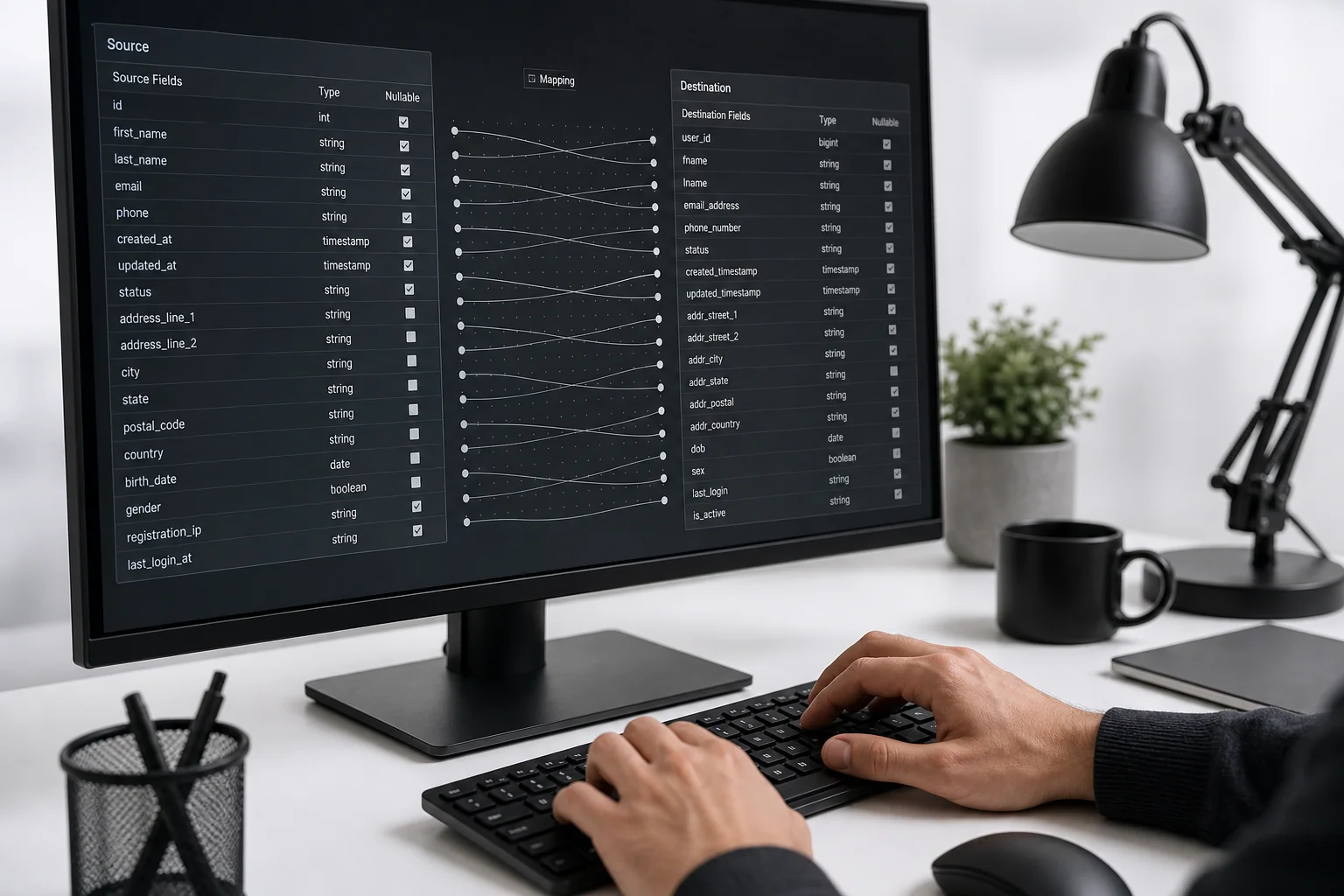
Every ERP integration starts with a list, not a line of code. Write down which objects need to move between the ERP and the web app: orders, invoices, stock levels, customer records, purchase orders. Then map each field on both sides.
This step catches the mismatches that cause silent failures later. An ERP might store weight in kilograms while your web app assumes pounds. Dates might come through as DD/MM/YYYY from a European SAP instance but your app expects ISO 8601. Currency fields sometimes carry no currency code at all, just a number, which breaks the moment you sell in more than one market.
Build a mapping table with three columns: ERP field name, web app field name, and transformation rule. This single document becomes the spec your developers build against and the reference your QA team tests against. Skipping it is the single biggest reason integration projects run over budget.
A mapping table that takes two days to write can save two weeks of debugging silent data corruption after launch.
Common mapping pitfalls worth flagging early: multi-currency inventory pricing, partial shipments that split one ERP order into several web app records, and tax fields that vary by country under EU VAT rules. Each of these needs an explicit rule, not an assumption.
SAP rarely connects cleanly straight from a web app. Its BAPI and RFC interfaces were built for internal enterprise systems, not modern REST clients, so most teams add a middleware layer, either SAP's own Cloud Integration service or a custom Node.js bridge that translates SAP's OData responses into JSON the web app can consume.
NetSuite is friendlier. Its SuiteTalk API supports both REST and SOAP, and a backend built in Node.js or Python can call it directly without a middle layer, as long as you handle NetSuite's governance limits (a cap on API calls per rolling time window).
Odoo is the simplest of the three for a growing SMB. Its XML-RPC and JSON-RPC endpoints are documented, stable, and designed to be called from external applications. A React or Next.js frontend can talk to a Node.js backend that calls Odoo directly, with no middleware required for most standard use cases.
Whichever ERP you're working with, the integration should live in your web app's backend layer, never in the frontend. Exposing ERP credentials or endpoints to client-side JavaScript is a security gap that shows up in a penetration test within minutes.
Get the authentication wrong and every other part of the integration becomes unreliable, because tokens expire silently and nobody notices until a sync job stops running. Use OAuth 2.0's client credentials flow for machine-to-machine ERP sync, store secrets in a managed vault rather than a config file, and build automatic token refresh so an expired token never causes a failed batch.
Most modern ERPs, including SAP, NetSuite, and Odoo's enterprise tier, support OAuth 2.0. The client credentials grant type is the right choice here because there's no human user logging in; it's your web app's backend authenticating as itself to pull or push data on a schedule.
Store the client ID, client secret, and refresh tokens in a secrets manager (AWS Secrets Manager, Azure Key Vault, or HashiCorp Vault), never in a .env file committed to a repository. Rotate credentials on a fixed schedule and log every authentication failure separately from data sync failures, so your team can tell instantly whether a break is a credentials problem or a data problem.
For Odoo specifically, older self-hosted instances sometimes rely on database credentials rather than OAuth. If that's your situation, restrict that account's permissions to only the objects your web app actually needs, following the principle of least privilege.
The sync layer is the code that actually moves data back and forth, and it's where most production incidents happen. Build it defensively from day one rather than patching it after the first outage.
Rate limits deserve special attention. NetSuite enforces a rolling governance limit; SAP's middleware layer often throttles based on your license tier. Design your sync jobs to batch requests and respect these limits from the start, rather than discovering them the first time your integration gets throttled mid-sync.
ERP syncs fail in production mainly from four causes: API rate limiting during high-volume periods, schema drift when the ERP vendor updates a field without notice, timezone mismatches between the ERP server and the web app, and partial failures where one record in a batch errors out and silently blocks the rest.
Schema drift is the sneakiest of the four. SAP and NetSuite both push periodic platform updates that can rename a field or change a data type without breaking their own internal tools, but silently breaking your integration. Version-pin your API calls where the ERP supports it, and subscribe to the vendor's release notes.
Timezone mismatches show up most often with businesses operating across the UK, Ireland, and continental Europe simultaneously. An order timestamped in UTC on the web app side but interpreted as CET on the ERP side can shift reporting by an hour, which matters for daily reconciliation.
Every major ERP offers a sandbox: SAP's IDES system, NetSuite's SuiteCloud sandbox account, and Odoo's own staging database. Run your integration against the sandbox for at least two full sync cycles before connecting to production data.

Test the edge cases that don't show up in a happy-path demo: partial refunds, backorders that split a single order into two shipments, multi-currency transactions, and what happens when the ERP is offline mid-sync. Each of these is common in real operations and rare in a rushed test plan.
Load-test the sync jobs too. A batch that runs fine with 50 test orders can behave very differently with the 5,000 orders a busy retail client processes on a Monday morning. Simulate that volume in the sandbox, not in production.
An ERP integration is not a one-time build. ERP vendors push updates on their own schedule, and your sync layer needs monitoring to catch problems before they become customer-facing.
Build a simple monitoring dashboard that shows the last successful sync time per data object, current queue depth, and recent authentication failures. This one screen answers most support tickets before a developer has to dig through logs.
For businesses operating across the UK and EU, GDPR governs where ERP data can be processed once it starts flowing into a web app's database. If your ERP is hosted in one region and your web app's servers sit in another, document the data flow and confirm your hosting provider's data processing agreement covers cross-border transfer, per guidance from the European Commission's data protection framework.
ERP integration connects operational data, inventory, invoices, purchase orders, and financial records, between the ERP and the web app. CRM integration connects customer-facing data instead: leads, deals, support tickets, and contact history. They solve different problems and often run as two separate projects.
Businesses sometimes need both. A web app might pull stock levels from an ERP for its storefront while pushing new customer signups to a CRM for the sales team. If you're weighing that second project, our guide comparing web application vs website architecture is a useful starting point, and a dedicated CRM integration guide walks through that setup separately from what's covered here.
A straightforward Odoo-to-web-app integration with a handful of data objects typically takes two to four weeks. A SAP integration involving middleware and multiple modules commonly runs six to twelve weeks, depending on how many objects need mapping and how much custom logic the SAP instance carries.
Yes. A React frontend talks to a Node.js or Python backend, and that backend calls Odoo's XML-RPC or JSON-RPC API directly. No middleware layer is required for most standard Odoo modules like sales, inventory, and invoicing.
In most cases, yes. SAP's BAPI and RFC interfaces are not designed for direct calls from a modern web backend, so a middleware layer, either SAP Cloud Integration or a custom bridge service, is the practical path for reliable, maintainable syncs.
Getting an ERP integration wrong costs more than a delayed launch. It costs duplicate orders, mismatched inventory, and finance teams reconciling numbers by hand. Axire Infotech's development team builds ERP bridges as part of its web development and app development work for European businesses, mapping data objects, setting up OAuth authentication, and building the retry logic that keeps syncs running quietly in the background. If your current site or app needs an interface rethink alongside the integration, our UI/UX design team can scope that at the same time. Browse our full services or see recent project work, then get in touch to scope your ERP bridge before it becomes a production fire drill.
Let's discuss your project and create something amazing together.